
iCalendar Feed
From version 2.8. This feature is still experimental.
In the settings under "Advanced Options" you can activate the iCalendar feed. iCalendar is a very common format for digital calendars. Most digital calendars allow you to add a URL from which calendar entries are automatically imported from the booking system into your digital calendar. These calendar entries are read-only, i.e. changes to the digital calendar cannot affect the booking system.
Once this feature is activated, you will find the individual calendar URL in the menu in the "My Bookings" overview.
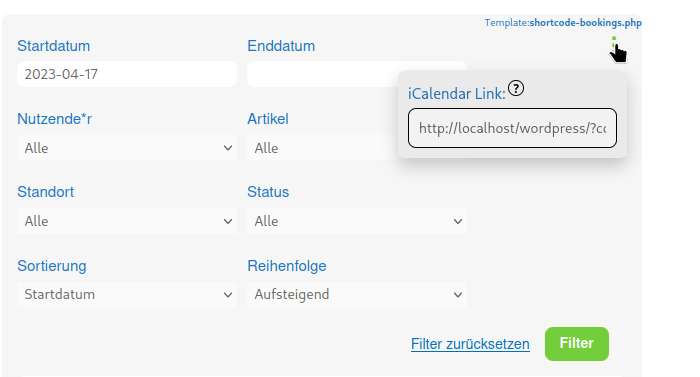
ATTENTION : This digital calendar not only lists your own bookings but all bookings you have access to. This has special implications for administrators and CommonsBooking managers who have access rights to locations or items. For more information: Assign access rights
ATTENTION: Past appointments currently still disappear from the calendar. This may change under certain circumstances.
Templates
The iCalendar feed differentiates between two types of bookings: Bookings made by the user themselves and bookings made by other users. If users have subscribed to the feed, they will mainly see their own bookings. If they have the appropriate permissions, locations can also see bookings made by other users. What is important to users is different from what is important to locations. For example, users are more interested in knowing where their location is and how they can pick up the item. Locations, on the other hand, are more interested in knowing the names of the users who are picking up the item and how they can be contacted. For this reason, there are two templates for displaying bookings:
- Own bookings: "Settings"->"CommonsBooking"->"Templates"->"iCalendar event title / description"
- Other users bookings: "Settings"->"CommonsBooking"->"Advanced Options"->"iCalendar Feed"
Use case: Location
This scenario is intended to briefly illustrate how this feature can be used meaningfully. Let's assume that as a location for bicycle rentals we want to automatically see in our digital calendar whether the bike was booked. For this purpose, we create a new user account for the location with the role CommonsBooking Manager. Then select the settings of the location to be managed and enter the user account in the list of CommonsBooking Managers.
Now the location account can view all bookings for this location via "My Bookings". If, as described above, the URL for the digital calendar is inserted into the calendar of the location operators, then they will see all bookings directly in their digital calendar.