
Integrating the user widget
The user widget contains links to personal bookings and to the login or logout page.
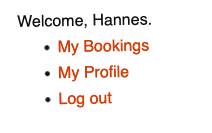
Follow these steps to integrate the widget into your site:
- Under Appearance -> Widgets, you will find the CommonsBooking User Widget among the "Available Widgets". Drag it to the desired sidebar, which is defined by your theme.
- Add a title, i.e., a heading and descriptive text, if desired.
- Create a booking list on the frontend by inserting the shortcode [cb_bookings] into a new page and publishing it.
- Define this new page as the Bookings Page under Settings -> CommonsBooking in the "General" tab.