
Frequently Asked Questions (FAQ)
Pages
- How do I show the booking comment on the page and in the email?
- How can I make the item detail page clearer?
- The site is very slow
- How do I show lock codes in emails?
I want to temporarily block individual users
Do you want to temporarily block users for a certain period of time, e.g. because they use the rental service excessively or violate the rental conditions?
I would advise you to simply block the entire login with an appropriate plugin for blocking users for a certain period of time. There are already some plugins for this. If your users can't do anything else on the site anyway other than booking bikes, it seems to make sense to do it this way.
I just briefly tried the plugin https://wordpress.org/plugins/user-blocker/ and it worked without any problems, even with a timer function. But this is not the only plugin that has this function.
Blocking specific user groups is not a feature in CommonsBooking and probably won't be added as a feature anytime soon, as there are already some plugins that do exactly that.
Allow overbookable days / booking over the weekend
If you want to allow your users to book the item over the weekend, for example, you can make this setting in the location settings.
More information at: https://commonsbooking.org/documentation/first-steps/create-location/
Increase the number of items in the cb_items list
The number of items per page is taken from the global WordPress settings.
These global settings can be changed here:
Log in as WordPress administrator:
Settings -> Reading -> Blog pages show at most
Incorrect display of the calendar widget in the admin area
If there are problems displaying the calendar in the admin area of the bookings (so-called admin backend), see the following picture on the bottom right, a possible solution can be to deactivate or remove and reinstall the "Lightstart" (wp-maintenance-mode) plugin . The problem is an incompatibility of Lightstart with CommonsBooking and not an error in the CommonsBooking code. The problem no longer occurs if Lightstart has been reinstalled. Read more about this on Github in the CommonsBooking source code repository .
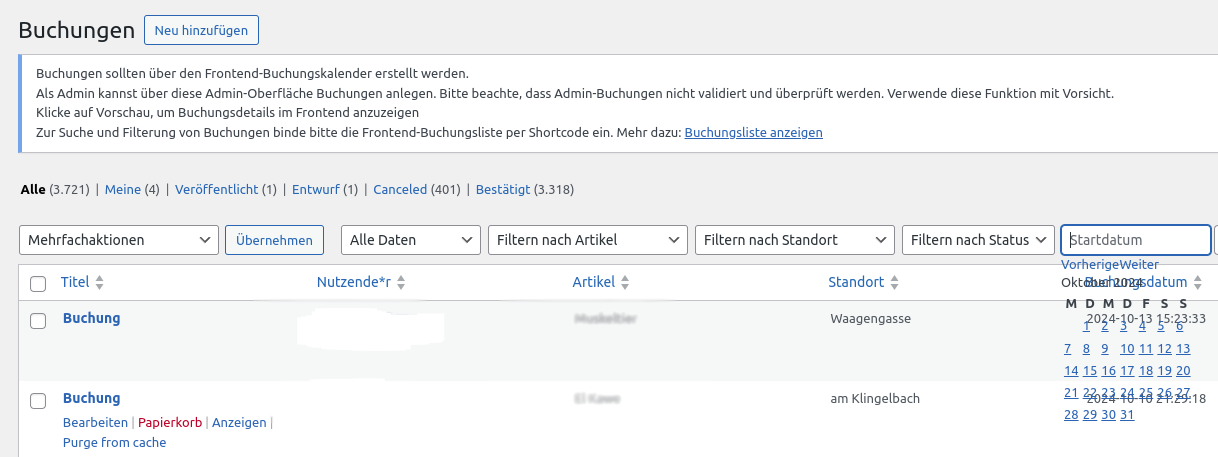
Incompatible plugin All-in-one-Event Plugins
Fixed since 2.7.2 (06.2022)
For experts see Issue 675
Unfortunately, using the "All-in-one-Event" plugin at the same time causes errors, so that pages generated by CommonsBooking are not displayed.
The cause is unfortunately due to poor programming of the All-in-one-Event plugin, which does not adhere to WordPress standards and intervenes so deeply in WordPress that it virtually overwrites the program logic of CommonsBooking.
We have tried a few things to enable parallel use, but unfortunately have not found a solution yet.
If you also have the problem, please write directly to the plugin's support, maybe they will adapt their plugin at some point.
Incompatible plugin REDIS Object Cache
In connection with the Cache, there have been problems with other WordPress plugins such as 'REDIS Object Cache' in the past. For this reason, we advise against using such plugins.
Therefore, the pages generated by CommonsBooking should be excluded from optimization by third-party plugins. CommonsBooking uses its own caching.
Incompatible plugin Ultimate Member
If you use the Ultimate Member plugin and want to use the "CommonsBooking Manager" user role, you have to check a box in Ultimate Member for the cb_manager role to activate it for AP admin access.
Incompatible plugins: Autoptimize / Caching
Optimization plugins or other caching plugins can cause CommonsBooking to not be able to display all pages.
Incomplete list:
- Autoptimize
Therefore, the pages generated by CommonsBooking should be excluded from optimization by third-party plugins. CommonsBooking uses its own caching.
Have you noticed a problem?
Then enter the incompatibility here!